


- For WooCommerce store owners who don’t want fines
Make your WordPress store 100 % EU-law compliant in just 60 seconds.
Without developers, specifications, or the risk of six-figure fines.
From 19 June 2026, a new law comes into force requiring you to give your customers the option to withdraw from a contract via an online form.
That’s why we built this one-click WooCommerce plugin, which instantly integrates the mandatory online withdrawal button into your store.
- 1-minute installation
- No coding required
- Fully automated

Time remaining until the new EU regulation takes effect:
The uncomfortable truth: consumer protection won’t warn you — it will only fine you.
If you currently handle withdrawals via email, buried Terms & Conditions links, or downloadable PDF forms, your store is an open target. From 19 June 2026, EU regulation (Directive 2023/2673) mandates a clear, easily accessible, and immediately confirmed online withdrawal function.
You have three options, but only one makes sense:
The “We’ll figure it out” option
You cobble together a basic contact form. At the first inspection, consumer protection tears it apart because it doesn’t identify the order, doesn’t issue an automatic receipt, and is legally challengeable.
Risk: a fine of up to 4 % of your revenue.
The “In-house developer” option:
You ask your web developer to build it from scratch. They’ll charge you 8–10 generous developer hours, it needs to be specified, tested, and at the next WooCommerce update the whole thing collapses.
Risk: ever-increasing development costs, requires regular updates.
The EU Cancel Guard option:
You download the plugin, activate it, and your problem is solved. EU Cancel Guard builds the withdrawal process in full compliance with the law, satisfying all requirements.
What happens if your WooCommerce store doesn’t comply with the regulation?
WooCommerce does not include a withdrawal function by default.
A poorly designed withdrawal process is a consumer protection risk.
Not every lapse automatically results in a fine, and the exact amount always depends on the circumstances of the individual case. But consumer protection fine ceilings are now high enough that experimenting with hastily assembled solutions is not a good strategy.
If you neglect your obligation, you can be fined up to 4 % of your revenue.
Even for non-large businesses, an upper limit tied to annual net revenue may apply.
If you neglect your obligation, the 14-day right of withdrawal is extended by 12 months.
If the store fails to properly inform the consumer of their right of withdrawal in the interface, the statutory 14-day withdrawal period is automatically extended by 12 months.
Why won’t a hastily added form or in-house development be enough?
Custom form
It seems flexible at first, but it easily turns into a multi-round, more expensive, and harder-to-maintain project.
- A simple fillable form isn’t enough because it doesn’t work with order data. That’s why custom development is needed.
- Days or weeks of development, back-and-forth, and stress with the developer.
- Ongoing maintenance costs, because WooCommerce updates break custom code.
- Manual administration. You have to dig through the system yourself to find out who withdrew and when.
- Uncertain legal compliance. A simple form doesn’t equal a legal requirement.
EU Cancel Guard
A solution built for this exact problem, working on your behalf.
- Instant, one-click activation. You install it, and the function goes live in your store immediately.
- Automatic updates. We monitor changes to WP and WooCommerce on your behalf and respond to them.
- Automated process. The buyer submits a request, the system records it, and sends an immediate confirmation.
- With optional multi-language support.
How do you get started?
Eliminate the fine risk in 3 clicks
Forget overcomplicated, sluggish systems. EU Cancel Guard does one thing, but flawlessly: with a single click it handles the mandatory online withdrawal process in your WooCommerce store — without unnecessary headaches.
- You don’t need to figure out the workflow from scratch.
- You don’t need to pay a developer for every small thing.
- You don’t need to disguise your contact form as a compliance process.
1. Download the plugin.
After successful payment you immediately receive the installation file. Our step-by-step guide makes it easy to install yourself.
2. Install it via the WordPress dashboard
Upload it to your WooCommerce site just like any other plugin.
3. Sit back and relax
The plugin automatically creates the law-compliant, order-linked online withdrawal interface. You’re done.
Features
Easy-to-use admin panel
From the admin panel you can easily manage individual settings, such as setting the withdrawal period, writing return instructions, or toggling other features on and off.

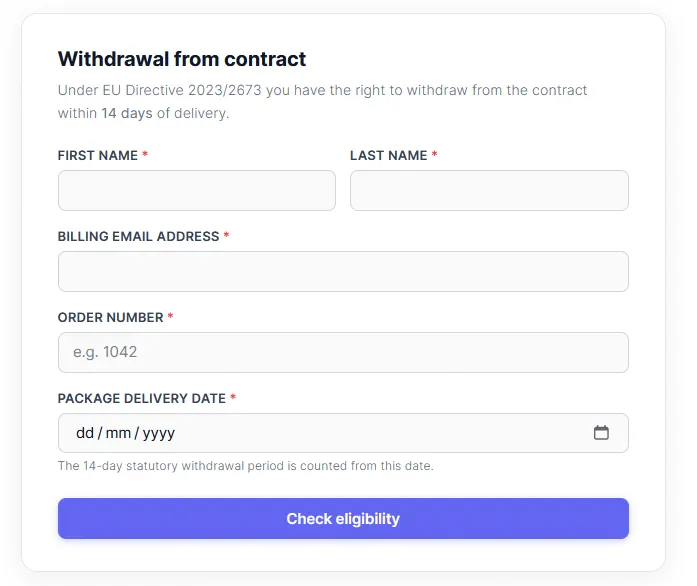
Clean, dynamic withdrawal form
A clean, elegant withdrawal form for the user that dynamically pulls order data once all details are entered correctly.
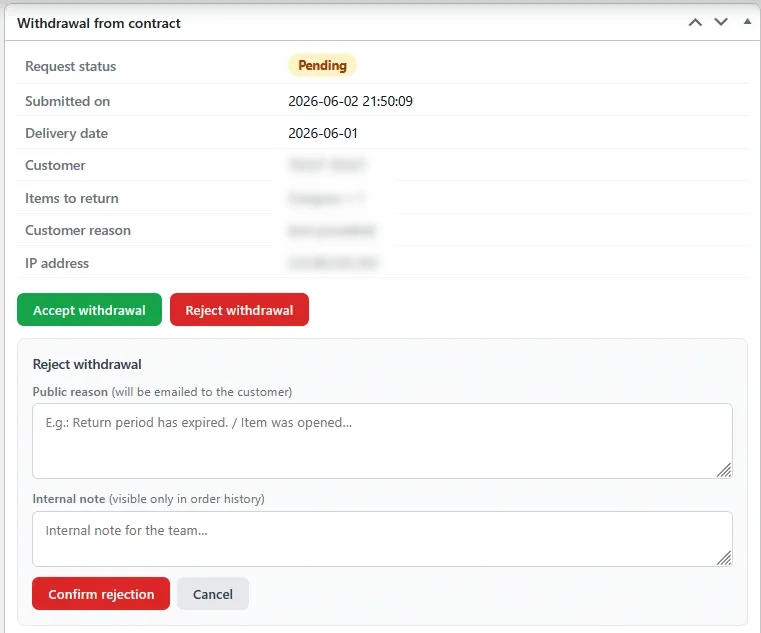
Acceptance and rejection of withdrawals within WooCommerce
A withdrawal can easily be rejected or accepted within the WooCommerce system on the relevant order.
Automatically sent emails
From the submission of the withdrawal request through to its acceptance, both parties automatically receive an email. The emails are accessible within the WooCommerce system.

Handle the mandatory withdrawal button once and for all — without developers or the risk of massive fines
If you have a WooCommerce store, don’t let the withdrawal process become a developer-legal-support ping-pong. EU CancelGuard is built exactly to help you handle it more simply.
- Simple installation in a few clicks.
- No coding required.
- The process is fully automated.
- You don’t need to disguise your contact form as a withdrawal.
EU Cancel Guard
Got multiple stores or running an agency? Get in touch with us at info@eucancelguard.com.
- Online self-service: the buyer can exercise their right of withdrawal via a quick form.
- One-click decision: the request can be immediately approved or rejected from the admin panel.
- Automated, instant communication: the system sends the confirmation and the decision by itself.
The subscription can be cancelled at any time.
Frequently Asked Questions
What if I already have a withdrawal form?
The question is whether it genuinely functions as a withdrawal process, or is simply a general contact form under a different name. In that case, it does not meet the new legal requirements.
Does the plugin only work in WordPress (WooCommerce) stores?
Yes, the plugin has been developed exclusively for WooCommerce stores. If you run a store on Shoprenter, Shoptet, Shopify, or another platform, the plugin will not work.
Why is it better than a free form builder (e.g. Contact Form 7)?
Because a plain form cannot verify the order ID, does not send a law-compliant, traceable automatic confirmation, and does not integrate with the WooCommerce database. EU CancelGuard acts in full compliance with the law, while a plain form does not.
Are additional settings required for the plugin?
The plugin requires the WooCommerce extension, which is the engine of the store. Additionally, since an email confirmation must be sent to the customer, the store must have correctly configured email-sending settings.
Is a developer really not needed?
Really. If you can upload an image to your store, you can install this plugin. It’s a single click.
Wouldn’t it be simpler to wait until I get fined and install it only then?
This is the most expensive strategy you can choose. Consumer protection rarely gives a warning first these days — if inspectors arrive and a mandatory element is missing, the fine starts immediately, even for the smallest businesses.
The annual fee for EU CancelGuard is a fraction of that. This isn’t a software expense; it’s an extremely affordable “insurance policy” so you can sleep soundly and focus on growing your business instead of worrying about legal issues.
Will I also need to update my Terms & Conditions?
Yes, by law you must also record the exact procedure for the new online withdrawal in your Terms & Conditions.
How is the plugin installed?
You will receive the plugin installation information in the confirmation email after purchase. Installation is straightforward and hassle-free — no harder than uploading an image.